Free Sales Invoice Template
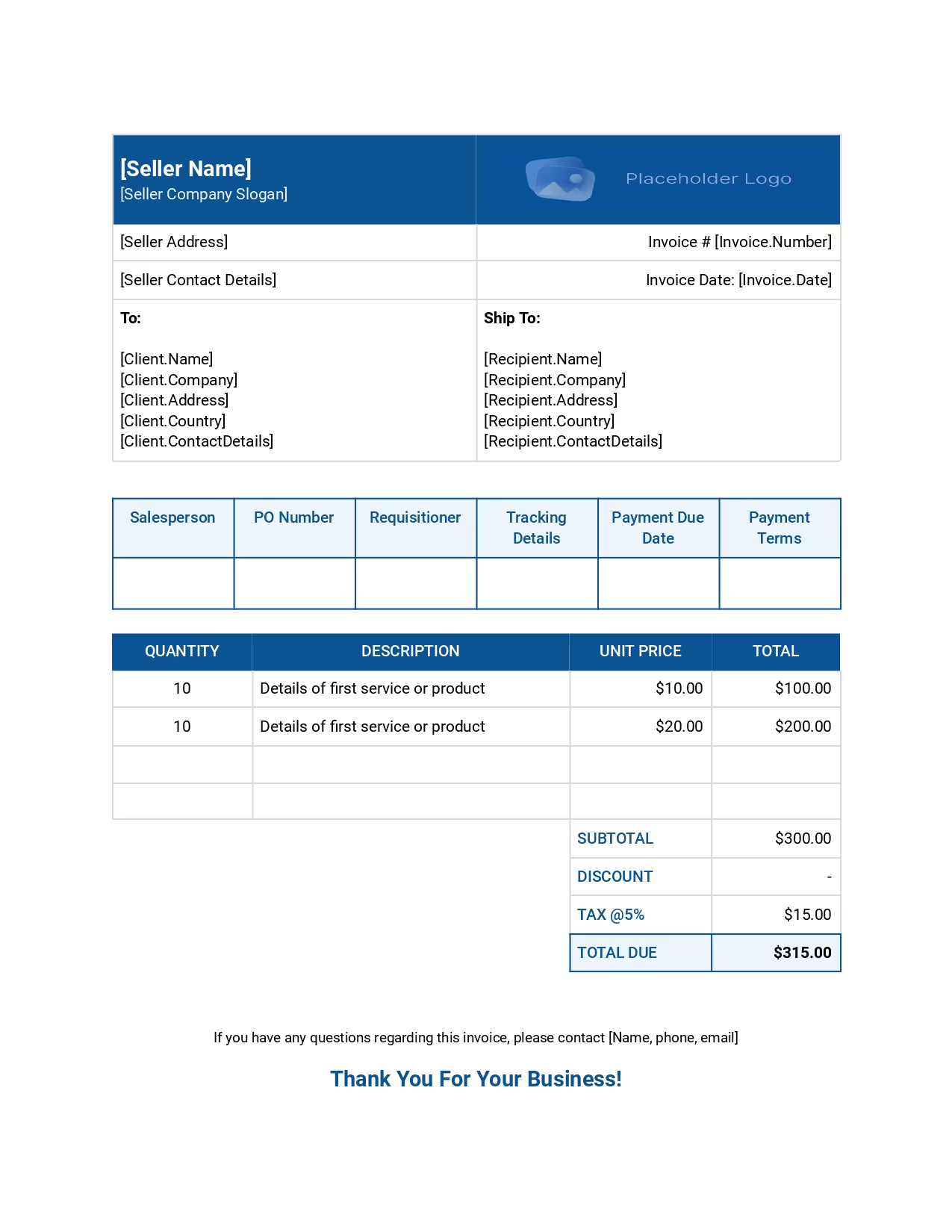
Our sales invoice template helps streamline your billing process while maintaining a professional appearance. Impress your clients with a professional-looking, concise sales invoice format.
The template includes all details for your services and ensures timely payments.

We have got you covered
Follow these simple steps to use our free sales invoice template effectively:

How can you use the template?
Follow these simple steps to use our free sales invoice template effectively:
Frequently
Asked Questions
Sales professionals should send beautiful invoices to reflect their business’s professionalism and leave a positive impression on clients. Well-designed invoices enhance clarity, making it easier for clients to understand the details and reducing the chances of disputes.
Additionally, attractive invoices reinforce the company’s brand identity, making it more memorable to clients. They also streamline the payment process, encouraging clients to pay promptly. High-quality invoices build trust with clients, showing that the business values accuracy and attention to detail.
The right time to send a sales invoice is immediately after the product or service has been delivered to the client. For product-based businesses, the invoice should be sent when the client receives all the goods. For service-based businesses, it should be sent right after the full service has been rendered.
Sending invoices promptly ensures timely payments and maintains a healthy cash flow. With Zomentum, creating and sending invoices is seamless. You can easily monitor their status and receive payments through Zomentum Payments, which supports recurring payments and automates customer reminder workflows. This ensures hassle-free and prompt payments, enhancing your overall billing process.
The main difference between a receipt and an invoice lies in their purpose and timing. An invoice is issued before payment, serving as a request for payment for goods or services provided. It includes details such as the items sold, quantities, prices, and payment terms.
On the other hand, a receipt is issued after payment has been made, serving as proof of payment. It confirms that the transaction is complete and includes details such as the amount paid, payment method, and date of payment.
Summarizing the differences, an invoice requests payment, while a receipt confirms payment.
A sales invoice template is a pre-designed document used by businesses to bill clients for products or services provided. It includes essential details such as the seller’s and buyer’s information, invoice number, date, item descriptions, quantities, unit prices, and total amounts.
The template ensures consistency, accuracy, and professionalism in invoicing, making it easier to track sales and payments. It can be customized to fit specific business needs and is available in various formats like Excel and PDF.
Using a sales invoice template streamlines the billing process, reduces errors, and enhances the overall efficiency of financial transactions.
Yes, there is an invoice template that can be edited in Word. Zomentum offers a versatile Sales Invoice Template that can be easily customized and used in Microsoft Word. This template is designed to streamline your billing process, ensuring accuracy and professionalism.
With Zomentum’s Sales Invoice Template, you can efficiently create detailed invoices, including client information, item descriptions, quantities, prices, and total amounts. The template is available in various formats, including Word, making it convenient for businesses to use and adapt to their specific needs.
To create a professional invoice using the free invoice template from Zomentum, follow these steps:
- Log in to Zomentum: Access your Zomentum account and navigate to the invoicing section to begin the process.
- Create a New Invoice: Click on ‘Create New Invoice’ to start a new online invoice and enter the necessary details.
- Enter Client Details: Fill in the client’s information, including business name, address, and contact information, to ensure accurate billing.
- Add Invoice Items: Include the itemized list of products or services provided, including quantity, description, unit price, and total amount for each line item.
- Customize Invoice: Adjust the invoice template to match your branding, including the company name, logo, and contact information, and add any additional details or notes as needed. Also, include the terms of payment beneath the list of the products and services at the bottom of the invoice.
- Review and Save: Double-check all the information for accuracy and save the invoice to your Zomentum account.
- Send Invoice: Email or print the invoice and send it to your client for payment, ensuring timely delivery.
Track Payments: Monitor the payment status through Zomentum Payment and follow up with clients if necessary to ensure prompt payment.
Yes, invoices need to be numbered. Assigning a unique invoice number to each invoice is essential for several reasons. It helps both the seller and the buyer track payments and manage their records efficiently.
Invoice numbers ensure that each invoice is unique, making it easier to reference specific transactions for accounting and tax purposes.
Sequential numbering systems are commonly used to maintain consistency and avoid duplication. Some countries also have regulations that require invoices to be numbered to comply with legal and tax requirements.
Invest your time in building client relationships,
not crafting sales proposals.
Average Win Rate on Proposals
Build Quote with our AI Module
Jump In Conversion Rate
More templates you might find useful
Website Maintenance Proposal Template
Website Strategy Audit Proposal Template
Technology Maintenance Agreement Template
What our Customers say about us
No clunky spreadsheets. No more multiple tools & endless tabs. Just revenue. Zomentum’s AI powers your

"Initially, we used it to overcome Microsoft's NCE hurdles with digital signage agreements. But then we discovered its versatility. Now, we rely on Zomentum to effortlessly build proposals, create business cases, and attach quotes directly to the proposal. It's streamlined our entire process, from proposal to billing. And it also integrates seamlessly with Autotask - our PSA and allows us to pull products and services from our inventory effortlessly."


"With the AI Proposal Writer, we save 1 hour every day, allowing us to focus on other important tasks. The Template Library has been a lifesaver, enabling us to swiftly create quotes across various products. Zomentum's standardization of our proposals ensures consistent messaging for all clients, resulting in improved quote-to-closure rates."


"The document template makes our sales proposals a more modern experience with embedded videos and multi-stakeholder digital signatures with a customizable sales pipeline system. Zomentum replaces multiple products with a single, fully integrated solution that solves many of the challenges we encountered with other platforms."


"Zomentum has truly transformed our proposal process, making it more efficient and professional. With its revenue automation features, we've experienced a remarkable increase in productivity, saving us valuable time. The AI Writer is a game-changer, allowing us to create personalized and high-quality content for each proposal quickly. It has significantly improved our lead conversion rate, enabling us to focus on the next opportunity."

Leave Documents to Us
You go Win Deals!
Create, share, sign and get paid all on Zomentum.