Free VAT Invoice Template
Our VAT invoice template is carefully created to streamline your invoicing process while ensuring compliance with tax regulations. Impress your clients with a professional tax invoice highlighting your business's credibility.
The template includes all necessary fields to create a comprehensive tax invoice statement.

We have got you covered
Here are the steps you can follow to use the VAT invoice template from Zomentum:
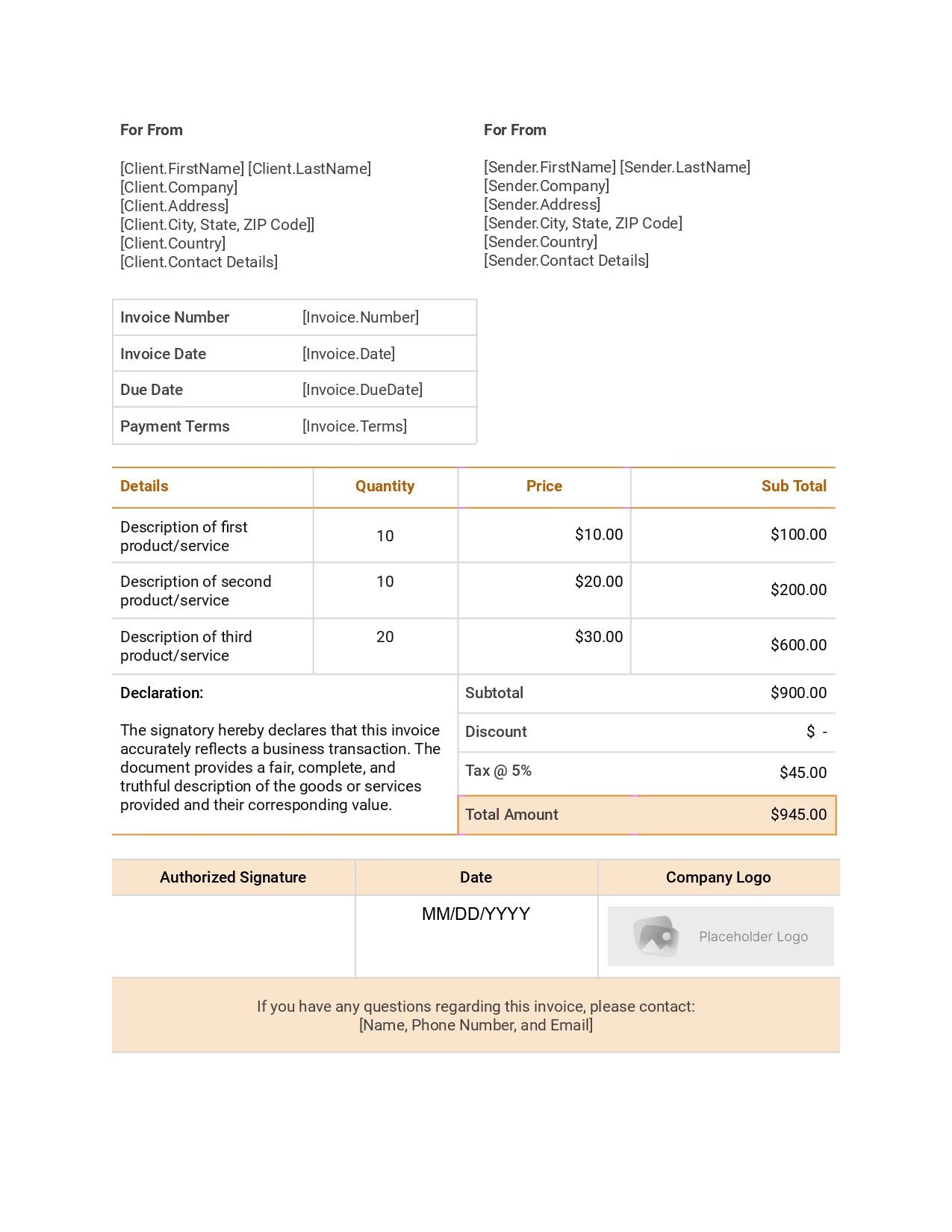

How can you use the VAT invoice template?
Here are the steps you can follow to use the VAT invoice template from Zomentum:
Frequently
Asked Questions
A VAT invoice should clearly state the name and address of both the seller and the buyer. It should also include a unique invoice number, the date of issue, and a detailed description of the goods or services provided. The invoice must specify the quantity and unit price of each item, as well as the total amount excluding VAT.
The VAT amount should be clearly indicated, and the total amount payable should be calculated by adding the VAT to the total excluding VAT. Finally, the invoice should be signed by both the seller and the buyer as a confirmation of the transaction.
A VAT invoice is a document issued by a seller to a buyer that details the goods or services provided and the applicable Value Added Tax (VAT). It includes essential information such as the seller's and buyer's details, invoice number, date, description of goods/services, VAT rate, and total amount payable.
VAT invoices are crucial for maintaining compliance with tax regulations, ensuring transparency in tax calculations, and providing an audit trail. They enable businesses to reclaim VAT on purchases and avoid legal penalties, making them vital for accurate tax reporting and financial management.
A VAT invoice template should include the following information:
- Seller's Details: The seller's business name, address, and VAT registration number.
- Invoice Details: A unique invoice number, the invoice date, and the due date for payment.
- Client's Details: The client's name, address, and VAT registration number, if applicable.
- Description of Goods/Services: A detailed description of the items or services provided.
- Quantity and Unit Price: The quantity of each item and the unit price.
- VAT Rate: The applicable VAT rate for each item.
- Total Amount: The subtotal, the VAT amount, and the total amount payable, including VAT.
These elements ensure compliance with tax regulations and provide a clear record of the transaction.
To create a correct invoice, follow these setup steps:
- Choose a Professional Template: Select a professional invoice template from Zomentum's template library that suits your business needs. You can download and customize the template in Microsoft Word, Adobe PDF, or Microsoft Excel.
- Enter Business Information: Include your business logo, name, address, email address, and phone number.
- Add Client Details: Enter the client's name, address, and contact information.
- Assign an Invoice Number: Use a unique invoice number for tracking and reference.
- Specify Invoice Date and Due Date: Clearly state the invoice date and the payment due date.
- List Goods/Services Provided: Provide a detailed description of the goods or services, including quantities and unit prices.
- Calculate Totals: Compute the subtotal, apply any discounts, add applicable taxes, and calculate the total amount due.
- Include Payment Terms: Specify the payment terms, including accepted payment methods (cash, cheque, bank transfer, credit card) and any late payment penalties.
- Review and Send: Double-check all information for accuracy and send the invoice to the client.
Using a digital VAT invoice template offers several advantages over a printed one. Firstly, digital invoices are more environmentally friendly, reducing paper usage and waste. They are also cost-effective, saving on printing, postage, and storage expenses. Digital invoices can be delivered instantly, ensuring faster payment cycles and improved cash flow.
They are easier to track and manage, with real-time updates and notifications. Digital invoices also reduce the risk of errors and loss, as they can be stored securely in cloud-based solutions.
Overall, digital VAT invoice templates enhance efficiency, accuracy, and sustainability in business operations.
Yes, a VAT invoice is different from a normal invoice. While both types of invoices confirm the details of a sale and serve as official requests for payment, a VAT invoice includes specific information about value-added tax (VAT). This includes the VAT registration number, the VAT rate applied, and the total VAT amount charged.
VAT invoices are issued by VAT-registered businesses for taxable supplies, ensuring compliance with tax regulations. In contrast, normal invoices are used for non-VAT transactions or transactions exempt from VAT and do not include these additional VAT details.
Creating a VAT invoice involves several steps to ensure compliance with tax regulations. First, register your business for VAT and obtain a VAT number. Next, include essential details such as your business name, address, VAT number, invoice date, and invoice number. Add the client's information, including their name, address, and VAT number, if applicable. List the goods or services provided, along with their quantities, unit prices, and VAT rates. Finally, calculate the total amount payable, including VAT.
However, creating a VAT invoice from scratch can lead to errors and inconsistencies. Using the VAT invoice template from Zomentum ensures accuracy, compliance, and professionalism, saving you time and reducing the risk of mistakes.
A well-designed VAT invoice template can streamline the invoicing process, reduce errors, and improve overall efficiency. By using a template, businesses can save time and resources, as the template includes all necessary fields and calculations.
A clear and professional-looking invoice can enhance a business's reputation and create a positive impression on clients. It also makes it easier to track and manage VAT payments, ensuring compliance with tax regulations.
The VAT invoice template from Zomentum is particularly beneficial as it is customizable, easy to use, and designed to meet the specific needs of various industries. Our templates help businesses maintain a clear and organized record of transactions, improve cash flow management, and enhance client trust by providing detailed invoices.
Yes, there are specific requirements and regulations for VAT invoice templates. The exact requirements may vary depending on the country and jurisdiction, but some common elements include:
- Uniqueness: Each invoice must have a unique identification number.
- Date of issue: The invoice must clearly state the date it was issued.
- Seller and buyer information: The name, address, and VAT registration number of both the seller and the buyer must be included.
- Itemized description: The invoice must provide a detailed description of the goods or services provided, including quantity, unit price, and total amount.
- VAT amount: The VAT amount must be clearly indicated, as well as the total amount payable, including VAT.
- Signature: The invoice should be signed by both the seller and the buyer as a confirmation of the transaction.
Invest your time in building client relationships,
not crafting sales proposals.
Average Win Rate on Proposals
Build Quote with our AI Module
Jump In Conversion Rate
More templates you might find useful
Website Maintenance Proposal Template
Website Strategy Audit Proposal Template
Technology Maintenance Agreement Template
What our Customers say about us
No clunky spreadsheets. No more multiple tools & endless tabs. Just revenue. Zomentum’s AI powers your

"Initially, we used it to overcome Microsoft's NCE hurdles with digital signage agreements. But then we discovered its versatility. Now, we rely on Zomentum to effortlessly build proposals, create business cases, and attach quotes directly to the proposal. It's streamlined our entire process, from proposal to billing. And it also integrates seamlessly with Autotask - our PSA and allows us to pull products and services from our inventory effortlessly."


"With the AI Proposal Writer, we save 1 hour every day, allowing us to focus on other important tasks. The Template Library has been a lifesaver, enabling us to swiftly create quotes across various products. Zomentum's standardization of our proposals ensures consistent messaging for all clients, resulting in improved quote-to-closure rates."


"The document template makes our sales proposals a more modern experience with embedded videos and multi-stakeholder digital signatures with a customizable sales pipeline system. Zomentum replaces multiple products with a single, fully integrated solution that solves many of the challenges we encountered with other platforms."


"Zomentum has truly transformed our proposal process, making it more efficient and professional. With its revenue automation features, we've experienced a remarkable increase in productivity, saving us valuable time. The AI Writer is a game-changer, allowing us to create personalized and high-quality content for each proposal quickly. It has significantly improved our lead conversion rate, enabling us to focus on the next opportunity."

Leave Documents to Us
You go Win Deals!
Create, share, sign and get paid all on Zomentum.